If you are researching custom CRM software, one of the first questions is usually simple:
How much is this actually going to cost?
The frustrating answer is that custom CRM pricing can vary significantly.
That is not because pricing has to be mysterious. It is because two businesses can both ask for a “custom CRM” while needing completely different systems.
One company may need a focused sales pipeline, customer records, follow-up tasks, and basic reporting.
Another may need multiple teams, custom workflows, sales-to-operations handoffs, client portals, data migration, automation, and integrations with several existing platforms.
Both projects are technically CRM projects.
They are not the same amount of work.
This guide explains what usually affects custom CRM pricing, what different project scopes can look like, and how to decide whether custom development makes sense for your business.
What actually makes a CRM “custom”?
A custom CRM is not simply a normal CRM with your logo added to it.
The value comes from shaping the system around the way your business actually manages customers and work.
That may include things such as:
Pipeline stages that match your real sales process
Custom customer or company records
Fields specific to your business
Automatic follow-up tasks
Appointment or scheduling workflows
Different permissions for different teams
Sales-to-operations handoffs
Custom dashboards
Integrations with software you already use
Customer or client portals
Workflow automation
Reporting built around the information management actually needs
The more of the business process the CRM needs to support, the larger the project becomes.
Typical custom CRM starting points
| Project Type | Typical Starting Scope | Implementation Starting Point | Ongoing Starting Point |
|---|---|---|---|
| Focused Custom CRM | Sales pipeline, customer records, tasks, follow-ups, basic automation, reporting | $1,500+ | $199/month+ |
| CRM + Operations | CRM plus project/job handoff, operational workflows, tasks, visibility, selected integrations | $3,000+ | $399/month+ |
| Broader Custom Business System | Multiple departments, custom workflows, portals, advanced automation, integrations, reporting | $5,000+ | Based on scope |
The biggest factors that affect CRM development cost
1. How many workflows need to be supported?
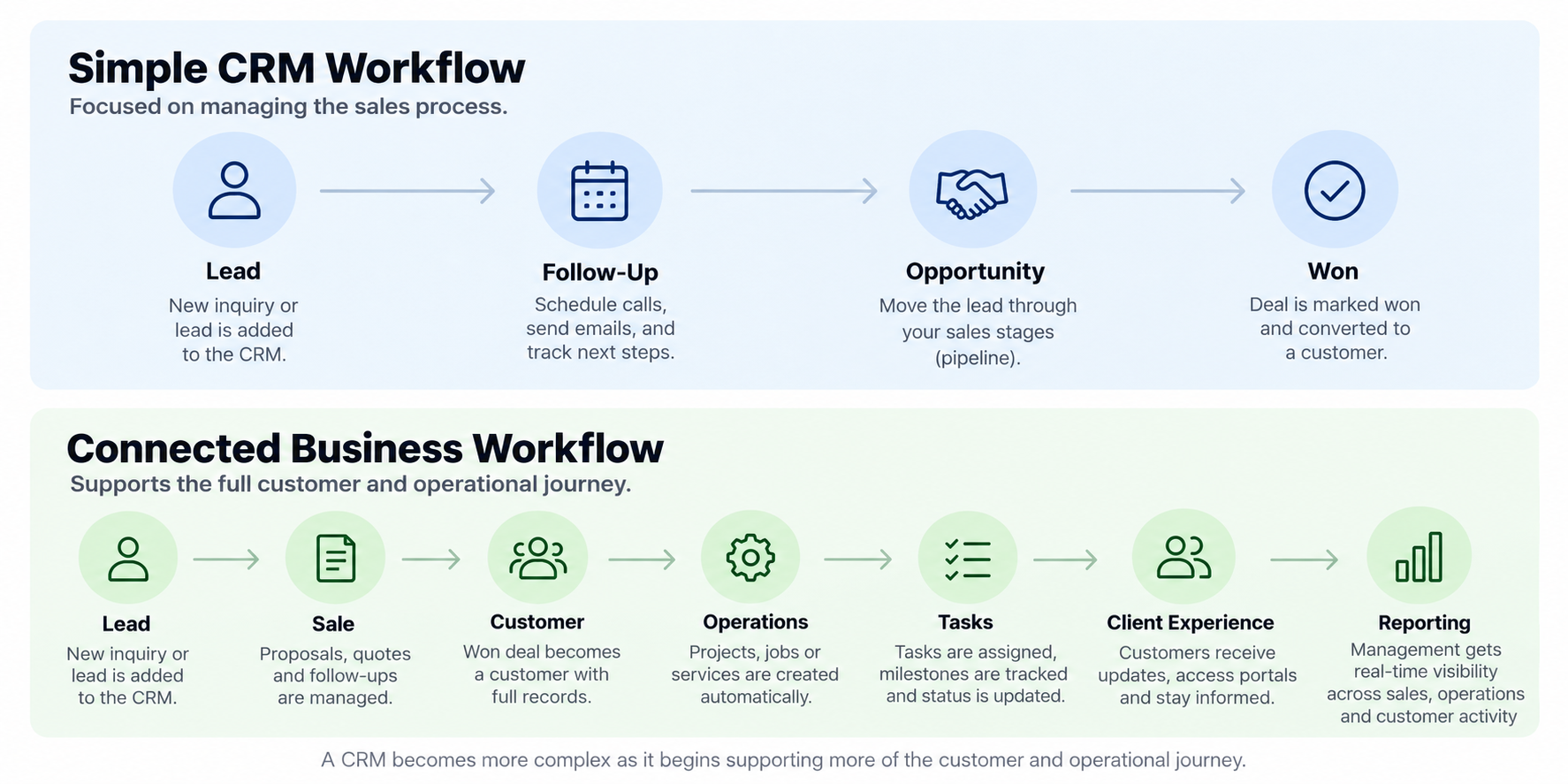
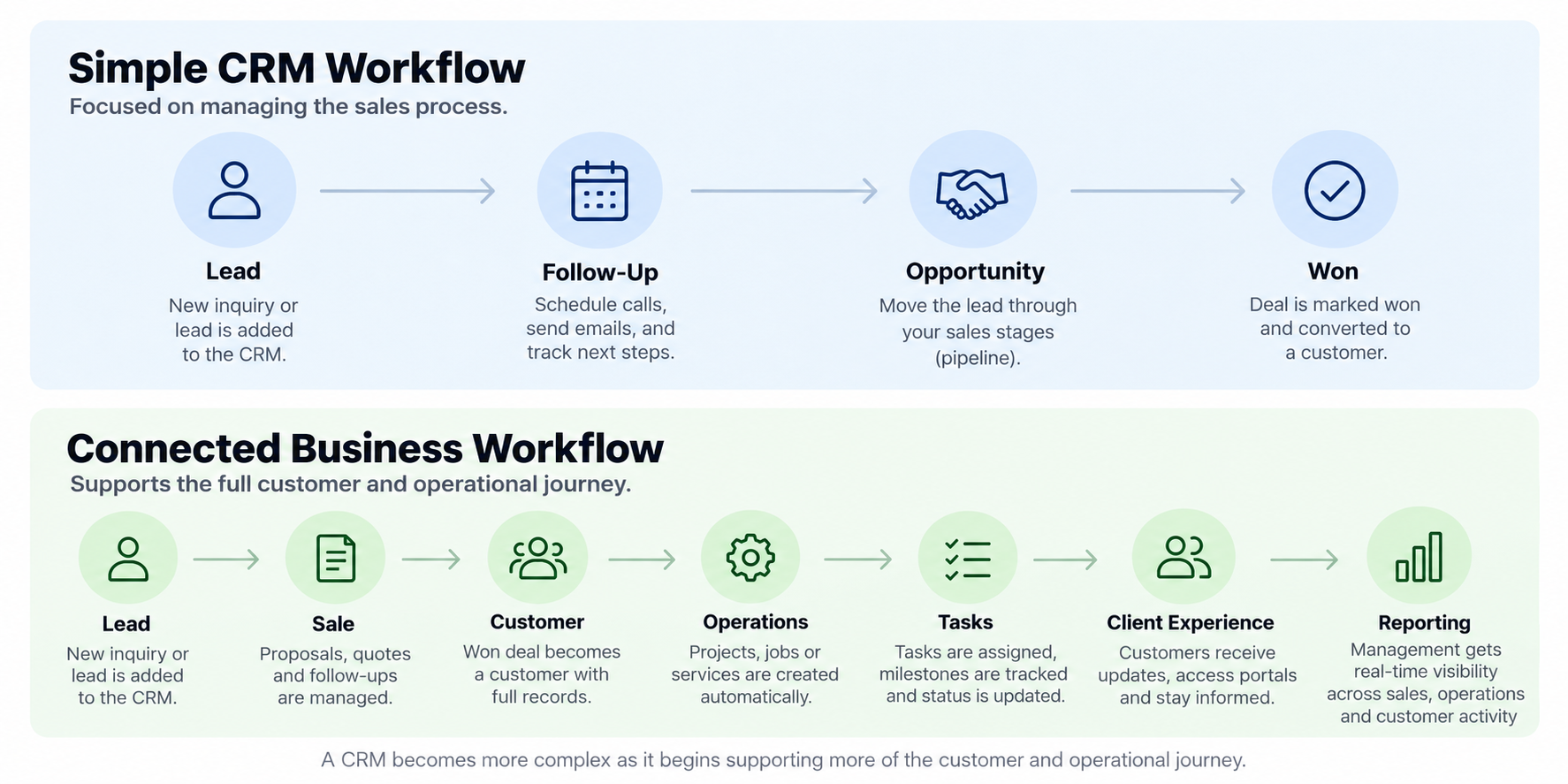
A CRM that only manages the sales pipeline is very different from a system that follows a customer from lead through delivery.
For example:
Lead → Consultation → Proposal → Customer
is a relatively focused workflow.
But:
Lead → Consultation → Proposal → Customer → Onboarding → Project → Delivery → Follow-Up
requires the CRM to interact with much more of the business.
Every additional workflow introduces more records, rules, statuses, permissions, and edge cases.
2. How many types of users need access?
User count alone does not necessarily make a system expensive.
User roles often matter more.
For example, a business may have:
Sales representatives
Sales managers
Operations staff
Administrators
Field employees
Executives
Clients
Each group may need a different view of the system.
A salesperson may only need assigned leads and customers.
Operations may need project details and scheduling.
Management may need reporting across the entire company.
Clients may need access to a completely separate portal.
That role structure adds design and development complexity.
3. How much automation is involved?
Automation can range from very simple to highly conditional.
A simple workflow might be:
New lead created → assign salesperson → create follow-up task
A more advanced workflow might be:
Deal marked won → create customer → generate project → assign operations team → create checklist → schedule milestones → send client onboarding → notify management
The more conditions, exceptions, branches, and systems involved, the more planning and testing the automation requires.
4. How many systems need to connect?
Integrations are another major pricing factor.
A CRM may need to exchange information with:
Accounting software
Payment systems
Calendars
Email platforms
Project management software
Industry-specific platforms
Website forms
Scheduling tools
Automation services
Some platforms provide straightforward APIs or webhooks.
Others provide limited access or require more custom work.
In some cases, keeping a system separate may actually be the better decision.
5. Does existing data need to be migrated?
If your business already has years of customer information, spreadsheets, notes, opportunities, projects, or historical activity, some of that data may need to move into the new system.
Migration complexity depends on:
Where the data currently lives
How consistent the records are
Whether duplicates exist
How fields need to be mapped
How much historical information should be preserved
Whether several sources need to be combined
Clean, structured data is usually easier to migrate than years of inconsistent spreadsheets.
What does a $1,500 custom CRM look like?
A project near the starting range should usually stay focused.
For example, a growing service business might need:
One primary sales pipeline
Lead and customer records
Custom business fields
Assigned salespeople
Follow-up tasks
Basic automation
Activity history
Simple reporting
A website form connected to the CRM
That can be enough to replace spreadsheets or a CRM that does not fit the sales process well.
What it probably does not include at that price point is an entire multi-department business operating system with portals, complex data migration, advanced integrations, and dozens of custom workflows.
That is why defining the first version matters.
Trying to figure out what your CRM would actually need?
Show us your current sales process, tools, and biggest points of friction. We can help identify a practical first scope.
What does a $3,000+ CRM and operations system look like?
This is where the system begins extending beyond sales.
A connected CRM and operations project might include:
Sales pipeline
Customer records
Opportunity management
Automated handoff after a sale
Projects or jobs
Task generation
Assignments
Operational status
Customer history
Basic dashboards
Selected integrations
Imagine an event venue.
Sales manages:
Inquiry → Tour → Proposal → Booking
Once the event is booked, the same customer and event information can move into:
Planning → Tasks → Event Details → Execution
Or consider a field-service company:
Lead → Estimate → Approval
becomes:
Schedule → Job → Technician → Completion
The CRM is no longer operating by itself. It becomes part of a broader business workflow.
When does a CRM become custom business software?
There is not always a clean line between a CRM and custom business software.
A system may begin as a CRM but eventually include:
Sales
Operations
Finance visibility
Client portals
Document workflows
Approvals
Scheduling
Custom reporting
Multiple departments
Integrations
Internal tools
At that point, “CRM” may no longer accurately describe what the system does.
It is becoming software that supports how the business operates.
That broader type of project is why DigaWork separates Custom CRM Development from Custom Business Software.
| Need | Off-the-Shelf CRM | Custom CRM | Custom Business Software |
|---|---|---|---|
| Standard Sales Pipeline | Strong fit | Strong fit | Usually unnecessary |
| Unique Sales Workflow | May require workarounds | Strong fit | Possible if broader needs exist |
| Sales + Operations | Often limited | Possible | Strong fit for complex workflows |
| Client Portal | Varies | Can be added | Highly flexible |
| Unique Internal Processes | Limited | Moderate flexibility | Strong fit |
| Complex Integrations | Depends on ecosystem | Customizable | Most flexible |
What about ongoing CRM costs?
Custom software does not stop existing when the initial development project is complete.
Depending on the engagement, ongoing service may include:
Hosting
Infrastructure
Monitoring
Maintenance
Bug fixes
Platform updates
Workflow adjustments
Integration maintenance
User support
Small improvements
Reporting changes
DigaWork’s focused CRM engagements currently begin at $199 per month for ongoing service.
Connected CRM and operations engagements begin at $399 per month.
The exact ongoing scope depends on the system and project agreement.
Third-party services may also have their own costs, including messaging platforms, accounting software, payment processors, API access, or other SaaS subscriptions.
When is custom CRM development worth it?
Custom CRM development tends to make more sense when:
Your sales process does not fit standard CRM stages
Your team relies heavily on spreadsheets or manual workarounds
Customer information exists in multiple systems
Sales and operations are disconnected
Your team repeatedly enters the same information
Important workflows depend on employees remembering the next step
Existing CRM software has become difficult for the team to use
The CRM needs to support processes unique to your business
The system needs to grow beyond basic sales management
It may make less sense when:
A low-cost existing CRM already handles the workflow well
The sales process is extremely simple
The business process is changing every few weeks
You mainly need standard contact management
The problem could be solved by configuring software you already own
How to keep a custom CRM project affordable
The easiest way to lose control of a custom software budget is to try to build every possible feature in version one.
A better approach is to start with the workflow creating the most value or the most friction.
For example:
Phase 1: Sales CRM
Then later:
Phase 2: Operations
Then:
Phase 3: Client Portal
Then:
Phase 4: Advanced reporting or additional integrations
Not every business should follow that exact sequence.
The principle is simply to build in useful stages.
A focused first version is easier to test, easier for the team to adopt, and easier to improve based on real usage.
Start with the workflow, not the feature list.
You do not need to know exactly what your CRM should include. Tell us how your business manages leads and customers today, and where the process starts breaking down.
Custom CRM Pricing FAQ
The cost of a custom CRM ultimately comes down to one question:
How much of your business does the system need to understand?
A focused sales CRM can be relatively straightforward.
A CRM that also supports operations, customers, automation, reporting, and integrations becomes a much broader software project.
That does not mean you need to build everything at once.
Start with the workflow that matters most.
Build the system around real usage.
Then expand when the business actually needs more.
Want to know what your CRM might actually cost?
Show us the tools, spreadsheets, pipeline, and follow-up process your team uses today. We’ll help you identify a practical first version and project scope.